Little LUMI Model 四個出廠就關掉的玩具
Bongo Lumi、 Floating Garden、 Pythagoras、 Window toss——一次開一個, 不要四個全開。
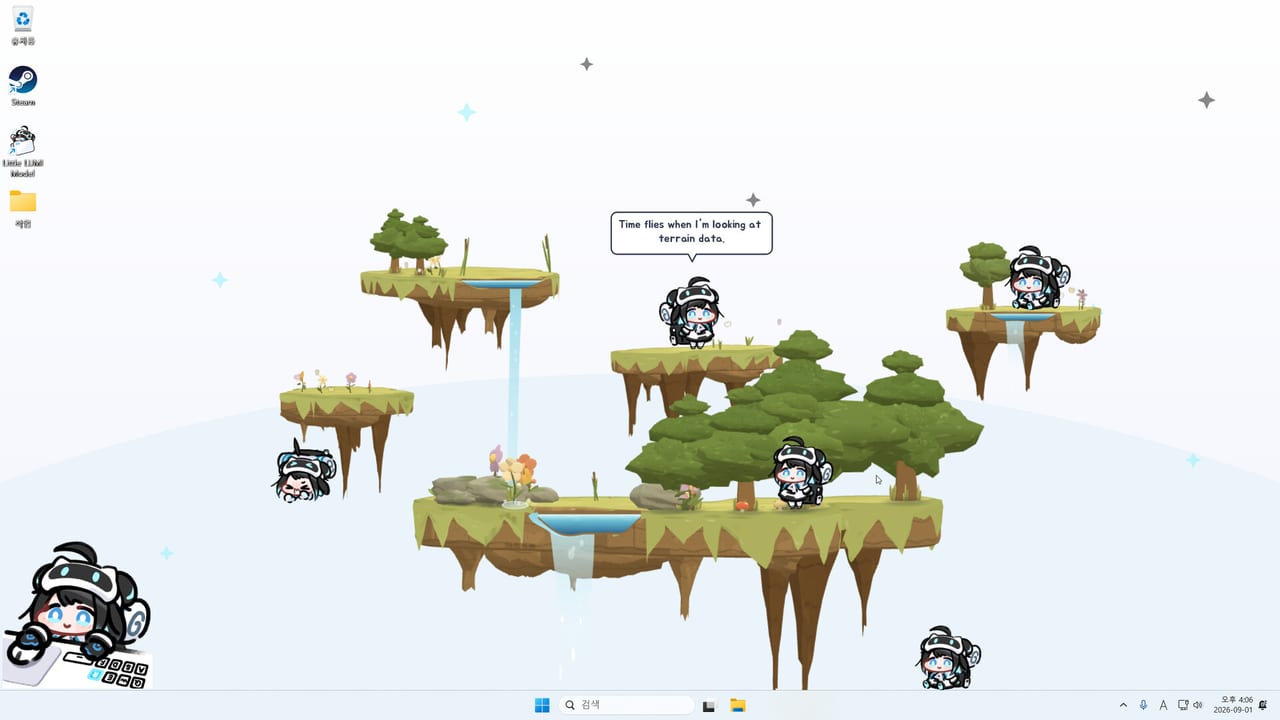
Little LUMI Model 出廠就關掉四個可選額外功能: Bongo Lumi、 Floating Garden、 Pythagoras、 Window toss。 它們是玩具, 不是安靜桌寵的一部分。 等入門指南與操作已經能跑再打開, 需要專注模式的工作時段前再關掉。 選用模式是排名頁; 本頁講每個玩具實際怎麼動。 指南樞紐列出姊妹文。
一次只開一個額外功能。 每一個都會改變她使用螢幕的方式, 疊在一起就很難判斷是哪個開關造成卡住的攀爬。 工作坊角色與額外 Lumi 算人群, 不算這四個玩具; 那些請另找晚上, 從工作坊與多隻 Lumi加入。
Bongo Lumi
Bongo Lumi 會在角落放一隻坐在桌子上的 Lumi。 你每次打字或移動滑鼠, 她就敲鼓。 十分鐘內很可愛, 對寫作很不友善。 想要節奏玩具時再用, 想要安靜 overlay 時不要用。 Sound Effects 必須開啟, 否則你只看得到動作。
Bongo Debut 是第一次接觸這個模式時對上的成就名稱。 不要在 Focus Mode 底下讓鼓繼續跑, 然後判定靜音壞了。 Focus Mode 停止的是寵物迴圈的說話與聲音; 專門的敲鼓玩具是你自己要求每個按鍵都有打擊樂。 把額外功能關掉。 I’ll Keep It Down 是安靜成就; 它跟角落鼓手不搭。
Floating Garden
Floating Garden 讓你在螢幕上畫島嶼與梯子。 樹木與瀑布是風景的一部分。 她走島、 爬梯、 坐在頂端。 先畫一條短路徑。 全螢幕迷宮會變成她迷路的地形, 而社群回報已經描述她在一般桌面卡進堆疊視窗; 濃密的花園只是更多能卡住的邊緣。
Opening the Garden 是對應的成就名稱。 花園請用在備用顯示器, 或你沒有在簡報的桌面。 Stay on this monitor only 能讓風景遠離簡報螢幕, 但社群回報那個鎖定可能凍住動畫——用疑難排解復原。 若那個應用程式在攀爬遊樂場裡, 不要把島畫在你正在打字的視窗上。
Pythagoras
Pythagoras 是疊在桌面上的小遊戲。 你放置平台、 彈簧床、 牆壁與梯子, 設定起點與終點, 並在編輯與執行之間切換。 重點是把 Lumi 送到終點。 它不是第二個產品, 也不是線上計分板。 把編輯與執行當成硬切: 要放零件時編輯, 要她嘗試路線時執行。 在錯誤模式下亂點, 人們會以為放置壞了。
Goal! 是完成那條迴圈的成就名稱。 若你在追名稱, 用成就追蹤與成就, 別把 Pythagoras 留在試算表中間。 玩完就關掉這個額外功能。
Window toss
Window toss 讓 Lumi 撿起一個視窗並扔出螢幕。 這不是操作裡的精靈丟出。 精靈丟出移動的是她。 Window toss 移動的是你的文件。 Out the Window 是成就名稱。 只在可拋棄的版面上啟用: 一份備用記事本、 一個你找得到的視窗、 一個你沒有在簡報的桌面。
永遠不要把 Window toss 跟 favours、 額外 Lumi 或正在使用的編輯器組合。 若 Settings 消失, 先檢查它是不是被扔出去了, 然後重啟並維持這個額外功能關閉。 熱修復 1.0.1的 Parade 凍結是另一個錯誤。
何時使用, 何時拒絕
想要故意製造噪音時用 Bongo。 有多餘像素、 想要不是標題列的家具時用 Garden。 在陪寵物玩、 而不是在寵物旁邊工作時用 Pythagoras。 Window toss 除了在用完即丟的視窗上當點名玩具之外, 幾乎不要用。
通話、 獨占全螢幕, 以及你還在學好感度的第一週, 四個都拒絕。 第一週與功能排名存在, 就是為了不讓你把玩具當安裝步驟。 基礎迴圈在行為。 關掉額外功能後跑一次設定核對清單。 修補: 更新樞紐與上市說明。 商店連結: 連結樞紐。
額外功能測試是操作測試的反面: 你能說出目前開著的是哪一個玩具、 能在同一時段關掉它, 而且編輯器視窗仍停在你離開時的位置。 若你叫不出玩具名稱, 它們就該全關。 若視窗不見了, 是 Window toss 開著。 若打字聽得到鼓, 是 Bongo 開著。 Garden 與 Pythagoras 會留下風景; 先刪風景, 再怪凍結。 然後回到工作列上的一隻 Lumi, 那才是你付 $3.99 買到的產品。 玩具可以週末再玩。
四個玩具的英文開關與成就名稱
出廠全關。 一次只開一個。 英文名稱不要翻譯成另一套產品。
| 玩具 | 成就名稱 | 它實際做什麼 | 工作時段 |
|---|---|---|---|
| Bongo Lumi | Bongo Debut | 角落桌寵,打字或滑鼠就敲鼓 | 關掉。 Sound Effects 要開才聽得到 |
| Floating Garden | Opening the Garden | 你畫 islands 與 ladders,她走上去 | 備用顯示器。 Stay on this monitor only 可能凍動畫 |
| Pythagoras | Goal! | editor / run,platforms trampolines walls ladders,送到 goal | 試算表中間不要留彈簧床 |
| Window toss | Out the Window | 她把 window 扔出螢幕 | 永遠不要靠近真正文件 |
對照不是玩具的東西: sprite throw 在操作; Call Another LUMI 與 Parade 在多隻 Lumi; LUMI Voice Pack 與 LUMI Chat 在工作坊; Focus Mode 與 I’ll Keep It Down 在專注模式。 Favours 不是 Window toss。 Hotfix 1.0.1 的 Parade 凍結也不是 Window toss 把 Settings 扔走。 排名見選用模式。
玩具驗收的英文反向測試
The extras test is the inverse of the control test.
- Name which one toy is on: Bongo Lumi or Floating Garden or Pythagoras or Window toss.
- Turn it off in one sitting from Settings.
- Editor windows still sit where you left them.
- If a window is gone, Window toss was on. Out the Window is the achievement name.
- If you hear drums while typing, Bongo Lumi was on. Bongo Debut maps here. Sound Effects must be on to hear it. Focus Mode will not cancel a drum toy. I’ll Keep It Down does not pair with a corner drummer.
- Garden and Pythagoras leave scenery. Opening the Garden and Goal! are the names. Delete islands, ladders, platforms, trampolines, walls before you blame a freeze. Stay on this monitor only can freeze animations.
- Sprite throw in Controls moves Lumi. Window toss moves documents. Never combine Window toss with Favours, extra Lumis, or a live editor. Parade freeze in hotfix 1.0.1 is a different bug.
- Enable one toy. Add Workshop or Call Another LUMI on another day. Rankings live on optional modes. You paid $3.99 for one Lumi on the taskbar.
Refuse all four during calls, exclusive fullscreen, and week one while you still learn affection. Use Bongo Lumi when you want noise on purpose and Sound Effects are on. Use Floating Garden when spare pixels exist on a monitor you are not presenting. Use Pythagoras when you are playing with the pet, switching editor versus run on purpose. Use Window toss never except as a named toy on a throwaway Notepad window. Goal!, Opening the Garden, Bongo Debut, and Out the Window will still be there later.
上市週打開玩具前的警告
2026 年 9 月 3 日到 17 日的折扣週, 最常見的失敗不是玩具壞掉, 而是四個開關一次全開。 Bongo Lumi 會在每個按鍵敲鼓, Floating Garden 會留下 islands 與 ladders, Pythagoras 會把 trampolines 留在試算表中間, Window toss 則可能把 Settings 扔出螢幕。 那四個英文名稱出廠都是 off, 請維持到入門指南與操作已經無聊。
一次只開一個。 開之前先確認 Sound Effects(Bongo 才聽得到)、 Show Tray Icon(卡住才叫得回來)、 Hide automatically while a fullscreen app is in front(會議才藏得住)。 Stay on this monitor only 能把花園釘在備用顯示器, 但社群回報那個鎖定可能凍動畫; 花園卡住時先刪風景, 再關鎖定。 Parade 凍結是熱修復 1.0.1的另一個錯誤, 不要跟 Window toss 搞混。
玩具成就之後還在: Bongo Debut、 Opening the Garden、 Goal!、 Out the Window。 第一週把時間花在摸頭與全螢幕隱藏, 比把桌面變成遊樂場更接近你付 $3.99 買到的產品。
常見問題
給剛裝好 Little LUMI Model 的人的短答。
哪個額外功能對上哪個成就名稱?
Bongo Debut、 Opening the Garden、 Goal!、 Out the Window。 其餘五十個名稱在 Steam overlay 與成就。
Window toss 跟丟 Lumi 是同一件事嗎?
不是。 丟精靈是滑鼠操作。 Window toss 讓她把視窗扔出螢幕。 靠近真正文件時請維持關閉。
Focus Mode 能讓 Bongo Lumi 安靜嗎?
別指望安靜工作開關去取消一個你為了噪音而打開的玩具。 把 Bongo 關掉。 專注模式是給基礎寵物迴圈、 全螢幕隱藏, 以及你故意武裝的鬧鐘。
Floating Garden 畫太密會怎樣?
濃密的 islands 與 ladders 會變成她迷路的地形。 社群已回報她會卡進堆疊視窗; 花園只是更多邊緣。 先畫一條短路徑, 卡在島上就停用這個額外功能, 再用疑難排解把她叫回工作列。
Pythagoras 的 editor 與 run 有什麼差別?
editor 用來放 platforms、 trampolines、 walls、 ladders, 並設起點與終點。 run 才讓她嘗試路線。 在錯誤模式下亂點, 會以為放置壞了。 玩完就關掉, 不要把彈簧床留在發票上面。 Goal! 是對應的成就名稱。