Little LUMI Model Four toys that ship switched off
Bongo Lumi, Floating Garden, Pythagoras, and Window toss — enable one, not all four.
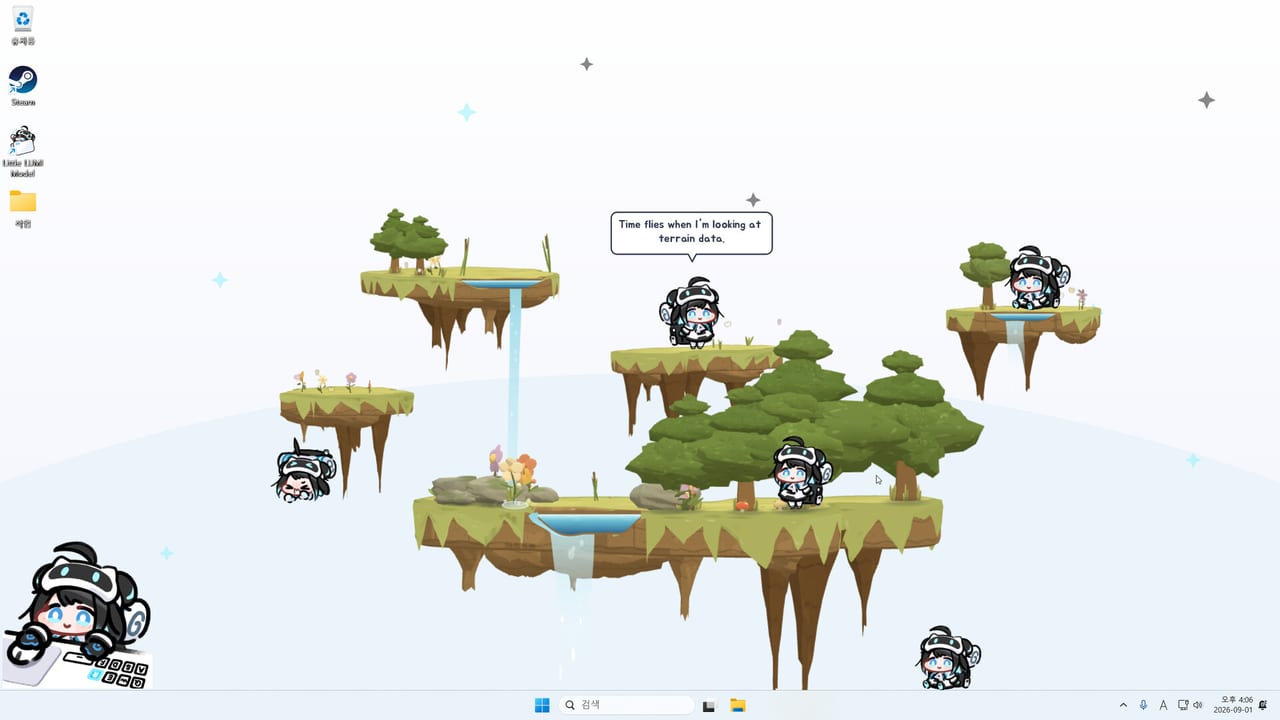
Little LUMI Model ships four optional extras off by default: Bongo Lumi, Floating Garden, Pythagoras, and Window toss. They are toys, not part of the quiet desktop pet. Enable them after Getting Started and controls already work, and turn them off again before a work block that needs focus mode. The optional modes list is the ranking page; this page is how each toy behaves. The guides hub lists siblings.
Enable one extra at a time. Each one changes how she uses the screen, and stacked toys make it hard to tell which switch caused a stuck climb. Workshop characters and extra Lumis count as crowd, not as these four toys; add those from the Workshop guide and multiple Lumis on a different evening.
Bongo Lumi
Bongo Lumi parks a desk-bound Lumi in the corner. She hits the bongos every time you type or move the mouse. That is delightful for ten minutes and hostile to writing. Use it when you want a rhythm toy, not when you want a silent overlay. Sound Effects have to be on or you will only see the motion.
Bongo Debut is the achievement name that maps onto first contact with this mode. Do not leave bongos running under focus mode and then decide the mute is broken. Focus stops speech and sound from the pet loop; a dedicated bongo toy is you asking for percussion on every key. Turn the extra off. I’ll Keep It Down is the quiet achievement; it does not pair with a corner drummer.
Floating Garden
Floating Garden lets you draw islands and ladders on the screen. Trees and waterfalls are part of the scenery. She walks the islands, climbs the ladders, and sits on top. Draw a short path first. A full-screen maze becomes terrain she can get lost on, and community reports already describe her wedging between stacked windows in the normal desktop; a dense garden is more edges to catch.
Opening the Garden is the matching achievement name. Use Garden on a spare monitor or a desktop you are not presenting. Stay on this monitor only can keep scenery off a presentation display, but community reports say that lock can freeze animations — recover via error help. Do not draw islands over the window you type in if that app is on the climb playground.
Pythagoras
Pythagoras is a small game layered on the desktop. You place platforms, trampolines, walls, and ladders, set a start and a goal, and switch between editor and run. The point is to send Lumi to the goal. It is not a second product and it is not an online scoreboard. Treat editor versus run as a hard split: edit when you want to place pieces, run when you want her to attempt the route. Clicking around in the wrong mode is how people think placement is broken.
Goal! is the achievement name for finishing that loop. If you are hunting names, use the achievement tracker and the achievements page rather than leaving Pythagoras in the middle of a spreadsheet. When you are done, leave the extra off.
Window toss
Window toss lets Lumi pick up a window and throw it off the screen. This is not the sprite throw in controls. Sprite throw moves her. Window toss moves your documents. Out the Window is the achievement name. Enable this only on a disposable layout: a spare notepad, a window you can find again, a desktop you are not presenting.
Never combine Window toss with favours, extra Lumis, or a live editor. If Settings disappears, check whether it was thrown, then restart and keep this extra off. The Parade freeze in hotfix 1.0.1 is a different bug.
When to use them, when to refuse
Use Bongo when you want noise on purpose. Use Garden when you have spare pixels and want furniture that is not a title bar. Use Pythagoras when you are playing with the pet, not working beside the pet. Use Window toss never, except as a named toy on a throwaway window.
Refuse all four during calls, exclusive fullscreen, and the first week while you are still learning affection. The first-week list and feature rank hub exist so you do not treat toys as setup. Base loops sit on behaviors. Run the settings checklist after you disable an extra. Patches: updates hub and launch notes. Store links: links hub.
The extras test is the inverse of the control test: you can name which one toy is on, you can turn it off in one sitting, and your editor windows still sit where you left them. If you cannot name the toy, they should all be off. If a window is gone, Window toss was on. If you hear drums while typing, Bongo was on. Garden and Pythagoras leave scenery; delete the scenery before you blame a freeze. Then go back to one Lumi on the taskbar, which is the product you paid $3.99 for.
Frequently Asked Questions
Quick answers for new Little LUMI Model owners.
Are the four extras on by default?
No. Bongo Lumi, Floating Garden, Pythagoras, and Window toss ship off. Turn them on only after Getting Started and controls already work.
Which extra matches which achievement name?
Bongo Debut, Opening the Garden, Goal!, and Out the Window. The rest of the fifty names are in the Steam overlay and on the achievements page.
Can I run all four extras plus extra Lumis?
You can. You should not. Enable one toy. Add Workshop or multiple Lumis on another day. Rankings are on the optional modes list.
Is Window toss the same as throwing Lumi?
No. Throwing the sprite is a mouse control. Window toss makes her throw a window off the screen. Keep it off near real documents.
Will focus mode silence Bongo Lumi?
Do not count on a quiet-work toggle to cancel a toy you enabled for noise. Turn Bongo off. Focus mode is for the base pet loop, hide-on-fullscreen, and alarms you armed on purpose.