Little LUMI Model Call another Lumi, then stop at two
Tray summons, social loops, Parade, the 1.0.1 Settings freeze, and a practical crowd size.
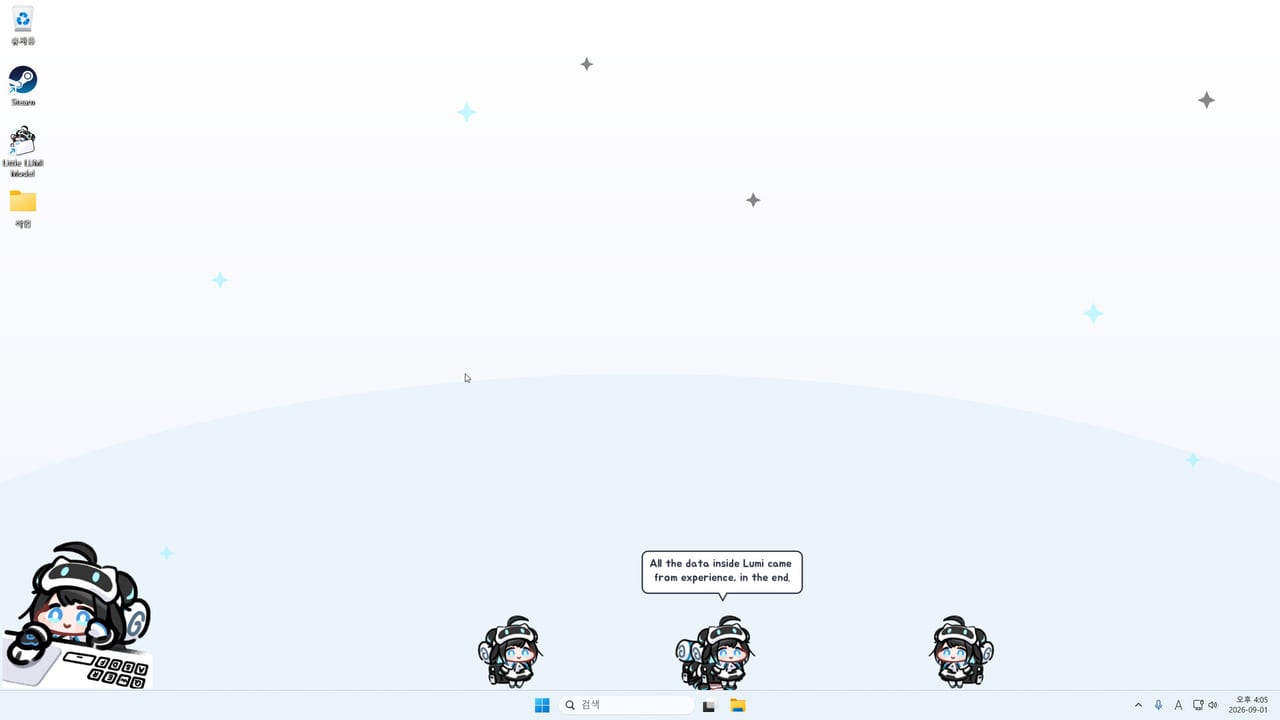
Extra Lumis are copies on the same local desktop. You summon them from the tray with Call Another LUMI. You do not invite another PC, you do not open a lobby, and you do not buy a second license for the privilege. Little LUMI Model is a single-machine companion. If that sentence is the only thing you take from this page, you are already ahead of a lot of confused screenshots. Sibling how-tos live on the guides hub.
Finish Getting Started and controls first so Show Tray Icon is on and you can call one Lumi to the cursor. Summon a second copy only after you can hide the first for fullscreen and toggle focus mode. A crowd during a work block is how people decide the software is too loud.
Summon, gather, dismiss
Tray → Call Another LUMI. She appears on this desktop and starts using the same terrain rules: taskbar, title bars, the climb playground you already picked. Call to cursor still works per sprite if you can click the right one; when you cannot, gather-on-call is the social behaviour that pulls them together so you can see the pile.
Home-tab affection (days together, head pats, stage names such as “Getting used to you”) is still your relationship with Lumi as a product, not a meter per copy. Read affection if you expected six independent stages. Solo loops stay on behaviors.
Dismiss extras by closing copies until one remains, or by restarting the app. Do not hunt for a network leave button. If Settings freezes while several copies are out, skip to the Parade section before you delete config files.
What they do together
With two or more they chat, high-five, share credits, march in a line, gather on call, and play tag. Credits that drop from the sky can be a small race; the chime still plays if Sound Effects are on. Meeting chats are also what the LUMI Voice Pack voices, using streamer Lumi’s recorded lines. The pack does not spawn extras. You spawn extras, then the pack has something to voice.
LUMI Chat remains a separate, optional, third-party Workshop item with an API key or local LLM. Do not install Chat because two sprites started talking. They already talk.
Tag and marches will walk across the window you are typing in if that app is on the climb list. Tighten the playground before you summon a third copy. Hide-on-fullscreen still applies: extras should vanish with the first Lumi when a fullscreen app is in front. If a copy remains visible, you likely have a windowed share, not exclusive fullscreen.
Parade and hotfix 1.0.1
Parade is a named group behaviour with two or more Lumis. On launch day, 3 September 2026, Studio LUMI shipped hotfix 1.0.1: it fixed an error dialog that could appear during Parade with two or more Lumis and also froze the Settings window. Install that hotfix before you treat Parade as a toy. Details live on the hotfix 1.0.1 page and the updates hub.
If you are on 1.0.1 and Settings still locks, treat it as a new incident: close the app from the tray or Task Manager, restart once, and stay at two copies. Community reports about stay-on-one-monitor freezing animations are a different problem; do not stack a monitor pin, a Parade, and a Workshop subscribe in the same minute. Error help is the repair list.
The Two of Them is the achievement name that maps onto a second Lumi. Overheard is the name people connect to catching talk. Do not invent a Parade-specific achievement title; if Steam shows one, it will be in the overlay with the rest of the fifty. Track named goals on the achievements page and the achievement tracker.
How many is too many
Owners often say about five is fine while browsing. That is a community comfort number, not a Studio LUMI cap. Floor is two for chats and high-fives. Workshop characters and optional extras count toward visual noise even though they are not tray copies.
Low-spec machines should stay at one. The listed minimum is 2.0 GHz x64, 2048 MB RAM, 400 MB disk, Windows 11. If hitching starts after the third copy, send them home. The first-week list puts extras late. Prefer a tight climb list and hide-on-fullscreen over Stay on this monitor only if you are already pushing five sprites; that lock has community freeze reports.
A sane order
One Lumi. Then two, no Parade, watch a high-five. Confirm 1.0.1. Then Parade. Then the Voice Pack if you want meeting chats. Then stop. Use the settings checklist, launch notes, and links (store, Workshop, listed streamerlumi.com mascot site).
The extra-Lumi test is social, not technical: you can summon a second copy, you can watch one high-five without Settings dying, and you can go back to one sprite before a meeting. If Parade throws a dialog, you needed 1.0.1 yesterday. If five copies hitch the desktop, you are past the browsing comfort zone. If you came here looking for an online session, you are in the wrong product — extra Lumis never leave this PC.
Frequently Asked Questions
Quick answers for new Little LUMI Model owners.
How do I add another Lumi?
Enable Show Tray Icon on the Screen tab, then use Call Another LUMI. Call to cursor gathers the one you want. There is no second-PC session. See controls if the tray icon is missing.
What do two or more Lumis actually do?
Chat, high-five, share credits, march in a line, gather on call, play tag, and Parade. Meeting chats can use the LUMI Voice Pack. They stay on this local desktop.
Settings froze during Parade. Is that known?
Yes. Hotfix 1.0.1 on 3 September 2026 fixed an error dialog during Parade with two or more Lumis that also froze Settings. Read hotfix 1.0.1 and update before you Parade again.
How many copies can I run?
There is no official cap. Community comfort while browsing is about five. Start at two. Stay at one on a machine that already meets only the 2 GB minimum. Workshop characters add visual noise too.
Does a second Lumi get her own affection stage?
No. Home-tab affection is days together and head pats for the companion you installed. Extra copies share the desktop; they do not split the six stages. Details are on affection.