Little LUMI Model When Lumi freezes, sticks, or never appears
Windows 11 limits, monitor-lock freezes, stacked windows, fullscreen hide, and missing Workshop rows.
This page is the repair list for Little LUMI Model, not a second Getting Started. Launch facts stay on the launch notes. The one official hotfix this wiki documents is 1.0.1 (3 September 2026): it stopped an error dialog during Parade with two or more Lumis that also froze Settings. Everything else below is either on the store spec sheet or labelled as a community report. Sibling how-tos sit on the guides hub. Confirm the machine and the patch, then change one setting at a time.
Windows 11 and the spec sheet
Official minimum: Windows 11, 64-bit, x64 processor at 2.0 GHz, 2048 MB RAM, 400 MB disk. Java is bundled; do not install a second runtime to fix a missing overlay. There is no extra account. Offline is the default. If the OS on the box is not Windows 11 x64, Studio LUMI does not list it, and this wiki will not pretend otherwise.
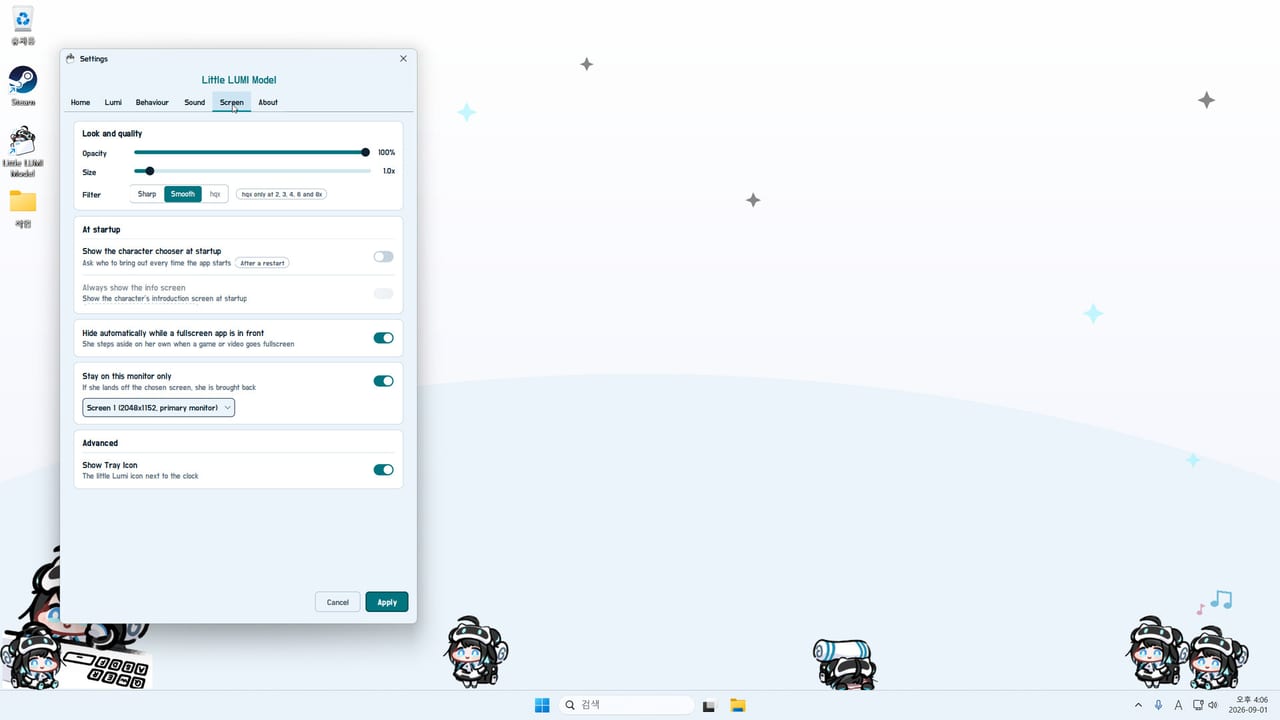
Low spec shows up as hitching once she sprints, once a second Lumi appears, or once a Workshop character joins. Stay at one sprite. Leave optional extras off. Size 1.0x, Sharp or Smooth, not hqx at 8x (hqx only at 2x, 3x, 4x, 6x, and 8x).
If she never appears after a fresh install, verify Steam files, launch from the library, and enable Show Tray Icon. The character chooser can sit behind another window; Alt-Tab before you assume a crash.
Animations freeze after pinning a monitor
Community report: Stay on this monitor only can freeze animations. If she became a still frame after you used the screen picker, turn the lock off, fully restart, and leave her unlocked until the machine is stable. Dual displays are supported; the pin is the suspect.
Moving Day is the achievement name people associate with changing displays. Do not grind it by flicking the picker. Prefer the climb playground in controls and hide-on-fullscreen over that lock.
Stuck between stacked windows
Community report: falling between stacked windows can get her stuck. Pick her up, throw her to the taskbar, or unstack the windows. Call to cursor from the tray if you cannot click her. A dense Floating Garden adds more edges; disable Garden if she sticks on islands.
Climbing a browser can steal attention. That is a community report; take the browser off the allowed-climb list. Focus mode will not fix a stolen window; it only stops speech and sound.
Fullscreen hide does not hide her
Screen tab: Hide automatically while a fullscreen app is in front. If she stays visible, the app may be borderless windowed rather than exclusive fullscreen. Try exclusive. Opacity, monitor lock, and focus mode are not hide.
Owners want per-app hide rules. That is a request, not an official list. Until it ships, use the climb playground, hide-on-fullscreen, opacity, or close the app.
Workshop item or voice pack not showing
Subscribe, wait for the download, fully restart Lumi. The LUMI Voice Pack (id 3795005580) appears on the Sound tab as “루미 보이스 팩” only after that. If Sound Effects are off or volume is zero, the pack is silent. The Workshop page says the voice plays when the app language is Korean. Set the pack to “Not used” to mute without unsubscribing.
LUMI Chat is a different, optional, third-party item that wants an API key or a local LLM. Disable Chat first if the base pet is the thing you are debugging. Extra characters belong in the startup chooser after restart; they do not inherit Lumi’s recorded voice. A huge wav download can sit on subscribed in Steam while the Sound tab is still empty. Wait, restart, then look again.
Parade dialog froze Settings
If two or more Lumis were Parading and Settings died, install hotfix 1.0.1, restart, and try again. If you are already on 1.0.1 and it still dies, kill the process, stay at two copies, and skip Parade until a new note on the updates hub. Do not confuse this with Window toss throwing Settings off the screen.
Broadcast mode / OBS (1.1.0)
Patch 1.1.0 (4 September 2026) adds a Broadcast tab. Start Broadcast mode and she leaves the desktop for an OBS capture surface. If the tab is missing, you are not on 1.1.0. If Start does nothing, quit from the tray and launch from Steam. If OBS is black, capture the Broadcast surface, not the game. Full walkthrough: Broadcast mode. Note: 1.1.0.
Persistence after Steam closes
Community request: survive with Steam closed, in the way Wallpaper Engine can. That is not official. If she exits when Steam exits, you are seeing current behaviour, not a corrupt install.
Who to write, and what to include
Support email listed on Steam: ai.init.alpha@gmail.com. The listed website is streamerlumi.com (AI streamer Lumi / Eternal Return mascot site, not a second store). Store and Workshop links sit on the links hub.
Before you write: Windows 11 build, RAM, monitor lock, extras, sprite count, Workshop items (Voice Pack vs Chat), and whether 1.0.1 is installed. Do not send API keys from Chat. Pre-mail pass: settings checklist. Named achievements: achievements page. Safer enable order: first-week list.
The repair test is dull on purpose: one Lumi, extras off, monitor lock off, hide-on-fullscreen on, Voice Pack either working on the Sound tab or set to “Not used”, Parade postponed until 1.0.1 is confirmed. If that dull desktop still freezes, you have a real ticket. If it only freezes after you re-enable the circus, you already know which switch to leave off.
Frequently Asked Questions
Quick answers for new Little LUMI Model owners.
What OS and spec does Little LUMI Model actually list?
Windows 11 x64, 2.0 GHz x64 CPU, 2048 MB RAM, 400 MB disk. Java is bundled. If the overlay never starts, verify those four items before adding Workshop content.
Stay on this monitor only froze her. What now?
Community reports blame that lock for frozen animations. Turn it off, restart, and keep her unlocked until stable. Use the climb playground and hide-on-fullscreen instead. See controls.
She is wedged between windows or climbing my browser.
Pick her up or call her from the tray, then unstack the windows. Take the browser off the allowed-climb list. Garden scenery can add more edges; disable it from optional extras.
The Voice Pack or another Workshop item never appears.
Wait for the download, fully restart, then look at Sound or the character chooser. Voice Pack id 3795005580 is "루미 보이스 팩". Chat is separate and optional. Steps are in the Workshop guide.
Parade threw an error and Settings froze.
That is the 1.0.1 bug if you are still on launch. Update using hotfix 1.0.1. Kill the process if Settings is already dead, then come back with two copies only.
Where do I send a real bug?
ai.init.alpha@gmail.com, listed on Steam. Include OS, sprite count, monitor lock, extras, and Workshop items. streamerlumi.com is the listed website, not a second store. Hub links are on links.