Little LUMI Model A seven-day enable order
S-tier quiet tools first. Toys and Workshop after the pet feels like furniture.
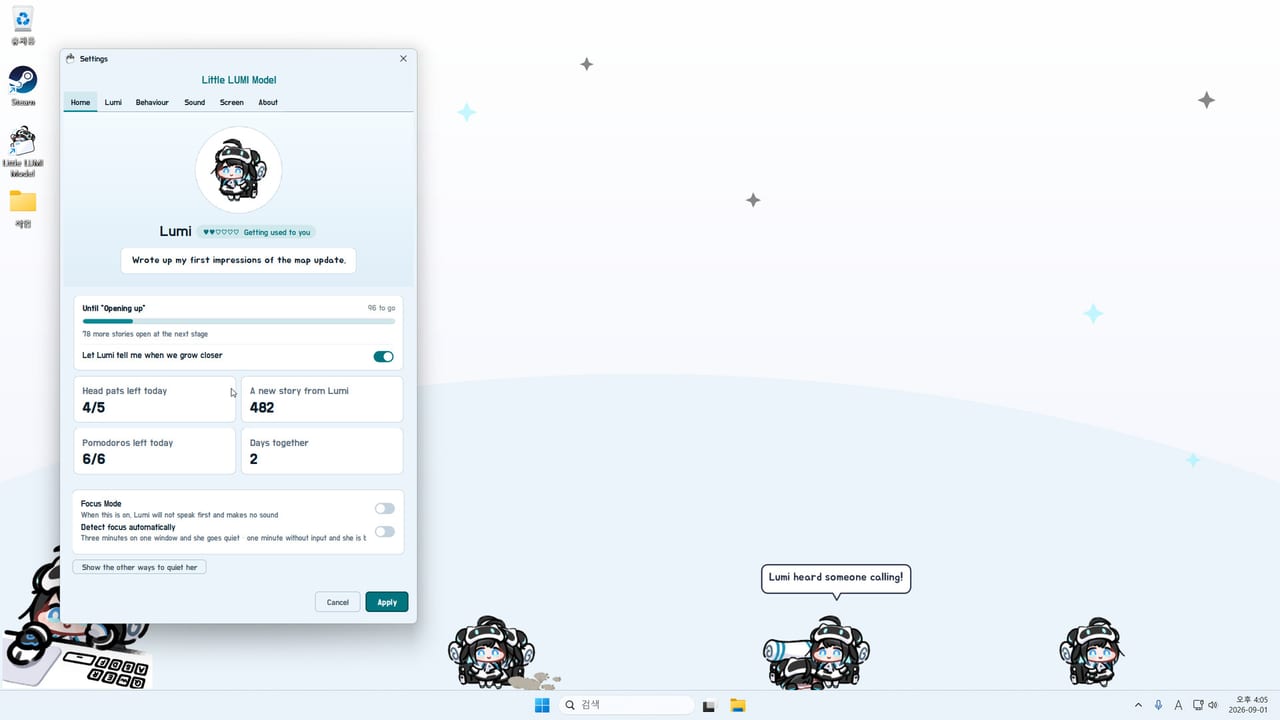
The first week of Little LUMI Model is a setup problem, not a story campaign. She launched on Steam on 3 September 2026 at $3.99 with a 20% intro through 17 September 2026. Java is bundled. She runs offline by default. Make her cute, then quiet, then — only then — sample toys. Pair this order with Getting Started, the settings checklist, and optional modes.
Ranks are wiki opinion grounded in store copy and launch reviews. A single 1080p panel used for screen shares should be even harsher on B-tier toys than we are.
Day 0: the machine
Windows 11 x64, 2 GHz, 2 GB RAM, 400 MB disk. Not Windows 10, not macOS, not a documented Steam Deck target. Install from Steam app 5075020, launch from the library, find the tray icon. There is no second runtime and no in-app code box. Let her walk the taskbar once before you open Settings so you have a baseline.
S-tier, before the first real work block
- Tray icon visible. You cannot quit cleanly or open Settings without it.
- Screen → hide on fullscreen. Games and shares stay clean.
- Screen → stay on this monitor. Dual-display users who skip this spend the week retrieving her.
- Screen → size and opacity. Big enough to pat; faint enough that a sprint is not a banner. Sharp / Smooth / hqx is taste — pick one at the chooser at startup if offered, then stop.
- Focus mode. Right-click settles her. Auto detect if you want her to notice work apps. Pomodoro if you already live on timers. Alarms can wait.
- One head pat. Confirm the cursor becomes a hand. Glance at Home for current/next stage. Details: affection.
That is the S-tier kit: hide, pin, size, focus, pat.
A-tier, days two to four
Limit which apps she may climb if your editor is a stack of floating panels. Keep Sound at default unless you already want audio. Let Steam apply hotfix 1.0.1 before extras — the 3 September 2026 note fixes a Parade dialog that froze Settings. Then Call Another LUMI once, watch a high-five, and send the extra away if the desktop feels busy. The Two of Them can wait for a calm evening.
Workshop characters are A-tier only after a full restart and only one at a time. Loop: Workshop guide. Turn info screen and chooser at startup off once you like the look.
B-tier, days five to seven — or never
Follow optional modes if you want toys: Voice Pack as 루미 보이스 팩 if the room can take it; Bongo after hours; Garden on a spare monitor; Pythagoras as a break; Window toss as a stunt, then off.
Skip the entire band if you bought her to sit on a taskbar during invoicing. You will not fall behind. Confirmed extras achievements (Bongo Debut, Opening the Garden, Goal!, Out the Window) will still be there later. Manuals: optional extras and controls.
C-tier, leave closed in week one
LUMI Chat (separate mod, API key) is not a first-week project. Fifty-unlock completionism is not either — use the tracker as a note. Max extra Lumis is a crowd on a 14-inch laptop. Throwing her during a live share is how you discover you forgot hide-on-fullscreen.
Daily loop
Morning: she is already in the tray (no launcher). Trust auto-hide in a fullscreen meeting. Midday: one pat if the 4/5 bar is sitting there. Afternoon: pomodoro if you use it. Evening: optionally one extra or one extra mode, never both on a tired brain. If Settings hard-locks with two Lumis, you missed the hotfix — close from Task Manager if you must, update, then read troubleshooting.
The intro discount ends 17 September 2026. That date is a store offer, not a feature gate. Week one is successful if she still exists on Friday and you did not yeet a work window. S-tier tools make that likely. Keep the order straight and the feature rank hub will still make sense on day eight.
Frequently Asked Questions
Quick answers for new Little LUMI Model owners.
What should I enable before my first work meeting?
Hide on fullscreen, stay on this monitor, a sane size/opacity, and focus mode. Pat her after the meeting, not during it.
When should I subscribe to Workshop items?
After the base pet feels stable, usually day two or later. Subscribe, fully restart, then pick characters or 루미 보이스 팩 on Sound.
Do I need extra Lumis in week one?
No. Try one after hotfix 1.0.1 if you want the social clips. Several Lumis are optional, local, and easy to overdo on a small laptop.
Is the intro discount required to access features?
No. $3.99 is the launch price; 20% off lasts through 17 September 2026. Features do not change with the sale.
Where is the click-by-click settings list?
The settings checklist walks Home, Lumi, Behaviour, Sound, Screen, and About. This page only ranks when to touch them.