Little LUMI Model A Settings tab pass, including Broadcast
Open the tray, open Settings, work top to bottom. Then close it.
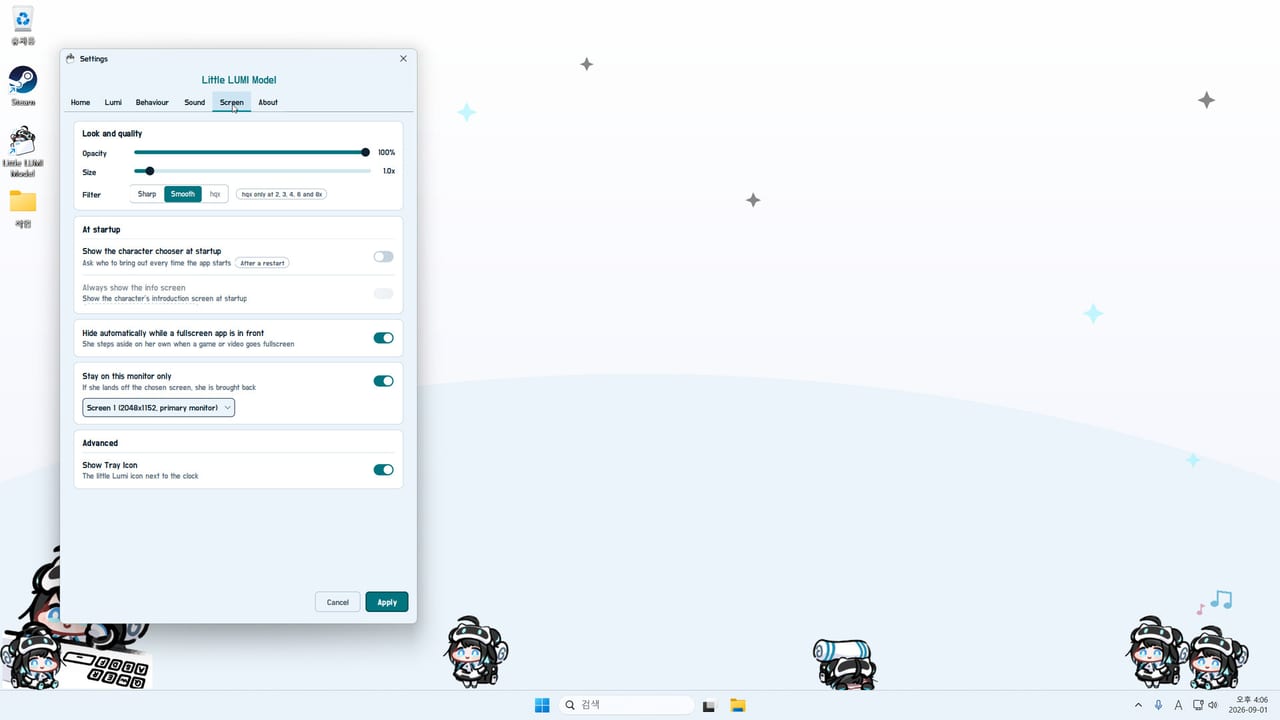
Use this page with Settings open. Tabs are Home / Lumi / Behaviour / Sound / Screen / About, plus Broadcast after patch 1.1.0. Defaults match first-week setup. Home numbers: affection. Frozen Settings with two Lumis: hotfix 1.0.1. Parent: Tools Hub. After this pass, use the achievement tracker.
Start on Screen, then Home.
Home
| Tick | Item | Done looks like |
|---|---|---|
| [ ] | Current stage | A name. Launch example: Getting used to you. |
| [ ] | Next stage | A name. Launch example: Opening up. |
| [ ] | Stories teaser | Lines waiting next. Example: 78. |
| [ ] | Head pats | Quota. Example: 4/5. |
| [ ] | Stories total | Example: 482. |
| [ ] | Pomodoros | Example: 6/6. Zero is fine. |
| [ ] | Days together | Example: 2. |
Studio LUMI has not published a full public six-name table. If Home looks empty, restart from the tray.
Lumi
| Tick | Item | Done looks like |
|---|---|---|
| [ ] | Character tab, not Screen hide rules | Appearance / instance options live here. |
| [ ] | One Lumi feels enough | Extras come from tray Call Another LUMI. |
| [ ] | Workshop walkers one at a time | Subscribe, restart, confirm the sprite. |
Behaviour
| Tick | Item | Done looks like |
|---|---|---|
| [ ] | Climb allow-list | Allowed on apps you want; blocked on shares. |
| [ ] | Focus mode known | Right-click settles her. Focus mode. |
| [ ] | Auto detect decided | On if she should notice work apps. |
| [ ] | Pomodoro decided | On only if you finish cycles. |
| [ ] | Alarms decided | Siren plus a minute of running is loud. |
| [ ] | Favours postponed | Register “show desktop” after pathing feels good. |
| [ ] | Optional extras still off | Bongo, Garden, Pythagoras, Window toss start off. |
Enable extras later via optional extras.
Sound
| Tick | Item | Done looks like |
|---|---|---|
| [ ] | Master volume sane | Alarms audible; self-talk will not blast a meeting. |
| [ ] | Voice Pack only if wanted | Subscribe, full restart, pick 루미 보이스 팩. |
| [ ] | Missing row? Wait the download | Pack appears after Steam finishes and Lumi restarts. |
| [ ] | LUMI Chat not required | Separate optional mod with an API key. Skip it here. |
Set sliders once. See achievements.
Screen
| Tick | Item | Done looks like |
|---|---|---|
| [ ] | Opacity | Dust skids visible; sprints not a banner. |
| [ ] | Size | Head hitbox is hittable. |
| [ ] | Sharp / Smooth / hqx | Pick one readable look. |
| [ ] | Chooser at startup | Off once you have a favourite. |
| [ ] | Info screen | Off if it blocks documents. |
| [ ] | Hide on fullscreen | On before the first game or share. |
| [ ] | Stay on this monitor | On if you have more than one display. |
| [ ] | Tray icon | Visible in the overflow. |
If she still climbs a share, see troubleshooting.
Broadcast (1.1.0)
Skip this table unless you stream. Full walkthrough: Broadcast mode. Patch note: 1.1.0.
| Tick | Item | Done looks like |
|---|---|---|
| [ ] | 1.1.0 installed | Steam news / About shows 1.1.0, not only 1.0.1. |
| [ ] | Broadcast tab visible | It sits with Home, Lumi, Behaviour, Sound, Screen, About. |
| [ ] | Start Broadcast mode only for OBS | She leaves the desktop overlay. Stop it after the stream. |
| [ ] | Hide-on-fullscreen decided | Off if you are capturing her; on if you are hiding her from a game. |
| [ ] | One Lumi | Do not Parade extras into a first Broadcast test. |
About
| Tick | Item | Done looks like |
|---|---|---|
| [ ] | Version readable | You can tell whether hotfix 1.0.1 and patch 1.1.0 are present. |
| [ ] | Support on file | ai.init.alpha@gmail.com. Store: Steam 5075020. |
| [ ] | Languages expected | English, Japanese, Korean, Simplified Chinese, Traditional Chinese. |
Close-out
- Settings accepts clicks with your current Lumi count.
- One head pat landed.
- Focus mode tested once.
- Optional extras still off on a work desktop.
Tick the boxes, close Settings, and let her walk.
Frequently Asked Questions
Quick answers for new Little LUMI Model owners.
Which Settings tab should I configure first?
Screen, if you work on that machine. Hide on fullscreen and stay on this monitor first.
Where do I pick the LUMI Voice Pack?
Sound tab, after a Workshop subscribe and a full restart. The list label is 루미 보이스 팩.
Do optional extras have their own tab?
They start off. Confirm they are off on a work desktop, then enable one at a time from the optional extras guide.
Home shows Getting used to you. Is that the first stage?
It is a current-stage label from a real Home tab. Studio LUMI has not published a full public six-stage name table.
Settings will not accept clicks.
If two or more Lumis were parading, install hotfix 1.0.1. Otherwise quit from the tray or Task Manager and follow troubleshooting.